Index is a database object, which can be created on one or more columns (16 Max column combination). When creating the index will read the column(s) and forms a relevant data structure to minimize the number of data comparisons.
The index will improve the performance of data retrieval and adds some overhead on data modification such as create, delete and modify. So it depends on how much data retrieval can be performed on table versus how much of DML (Insert, Delete and Update) operations.
Clustered Index
The primary key created for the StudId column will create a clustered index for the Studid column. A table can have only one clustered index on it.
When creating the clustered index, SQL server 2005 reads the
Studid column and forms a Binary tree on it. This binary tree information is then stored separately in the disc. Expand the table Student and then expand the Indexes. You will see the following index created for you when the primary key is created:
With the use of the binary tree, now the search for the student based on the
studid decreases the number of comparisons to a large amount. Let us assume that you had entered the following data in the table student: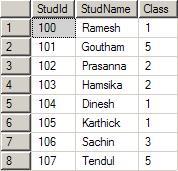
The
index will form the below specified binary tree. Note that for a given parent, there are only one or two Childs. The left side will always have a lesser value and the right side will always have a greater value when compared to parent. The tree can be constructed in the reverse way also. That is, left side higher and right side lower.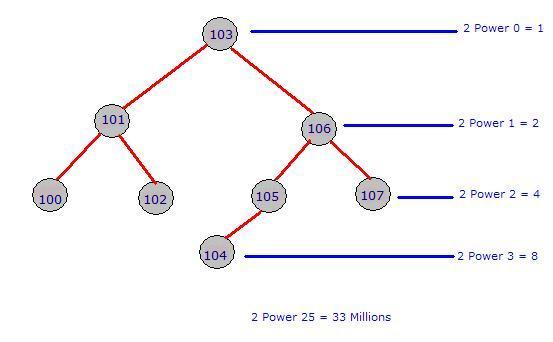
Now let us assume that we had written a query like below:
Select * from student where studid = 103;
Select * from student where studid = 107;
Execution without index will return value for the first query after third comparison.
Execution without index will return value for the second query at eights comparison.
Execution without index will return value for the second query at eights comparison.
Execution of first query with index will return value at first comparison.
Execution of second query with index will return the value at the third comparison. Look below:
Execution of second query with index will return the value at the third comparison. Look below:
- Compare 107 vs 103 : Move to right node
- Compare 107 vs 106 : Move to right node
- Compare 107 vs 107 : Matched, return the record
Non Clustered Index
A non-clustered index is useful for columns that have some repeated values. Say for example,
AccountType column of a bank database may have 10 million rows. But, the distinct values of account type may be 10-15. A clustered index is automatically created when we create the primary key for the table. We need to take care of the creation of the non-clustered index.
CREATE INDEX idx_pname
ON Persons (LastName, FirstName);
Clustered Index
- Only one clustered index can be there in a table
- Sort the records and store them physically according to the order
- Data retrieval is faster than non-clustered indexes
- Do not need extra space to store logical structure
Non Clustered Index
- There can be any number of non-clustered indexes in a table
- Do not affect the physical order. Create a logical order for data rows and use pointers to physical data files
- Data insertion/update is faster than clustered index
- Use extra space to store logical structure
Interesting Facts
- If a CLUSTERED INDEX is present on the table, then NONCLUSTERED INDEXES will use its key instead of the table ROW ID.
- To reduce the size consumed by the NONCLUSTERED INDEXES it’s imperative that the CLUSTERED INDEX KEY is kept as narrow as possible.
- Physical reorganization of the CLUSTERED INDEX does not physically reorder NONCLUSTERED INDEXES.
- SQL Database can JOIN and INTERSECT INDEXES in order to satisfy a query without having to read data directly from the table.
- Favor many narrow NONCLUSTERED INDEXES that can be combined or used independently over wide INDEXES that can be hard to maintain.
- Create Filtered INDEXES to create highly selective sets of keys for columns that may not have a good selectivity otherwise.
- Use Covering INDEXEs to reduce the number of bookmark lookups required to gather data that is not present in the other INDEXES.
- Covering INDEXES can be used to physically maintain the data in the same order as is required by the queries’ result sets reducing the need for SORT operations.
- Covering INDEXES have an increased maintenance cost, therefore you must see if performance gain justifies the extra maintenance cost.
- NONCLUSTERED INDEXES can reduce blocking by having SQL Database read from NONCLUSTERED INDEX data pages instead of the actual tables.
Comments
Post a Comment